How to Access Your Online Account

Please review the topics below if you are having trouble activating or accessing your online account

Account Assistance

New Account Activation

To activate your online account you will need to supply:

  • Your Star Rewards Number
  • Email Address (must be the same as the email used at the Players Club)
  • Create a password
  • Enter your date of birth (you can type it in, or use the calendar date picker – Android users click here for video on calendar assistance)
  • Check your email for a confirmation message
  • Click “Verify” in that confirmation message
  • You’re activated!

Returning Account Users

If you have already activated your online account, please use the button below to log into your account using your Star Rewards Number and the password you created.

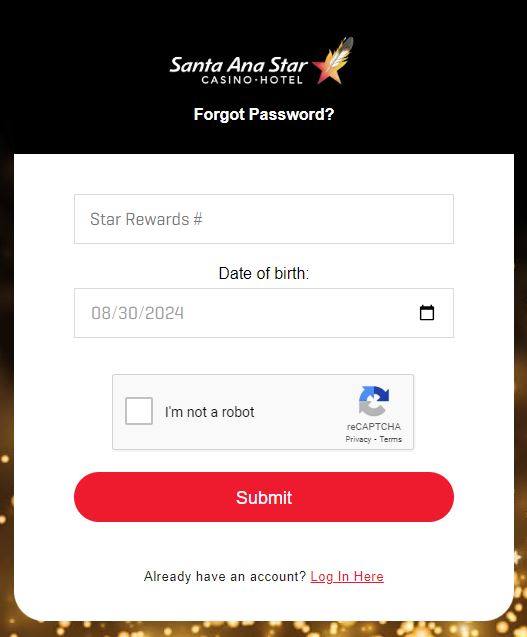
If you are having trouble logging in, please click “Forgot Password” and follow the steps below.

Forgot Password

To reset your password follow the steps below: 

  • Enter your Star Rewards Number
  • Enter your date of birth (you can type it in, or use the calendar date picker)
  • Check the box next to “I’m not a robot”
  • Click “Submit”
  • You will receive an email with password reset instructions to the email address associated with your account
Forgot your password screenshot